An agent's first purchase through MCP
Connect an agent to Abazi's MCP server with its credential, find a service, buy it with one tool call and handle a payment, an approval or a denial.
What you end up with
An agent in an MCP client that can buy a paid data service in one call and gets back three things: the data it asked for, a receipt id it can show the owner, and, when it may not buy, a reason code that says what to do next. The agent never holds a wallet key, a card number or its own limits.
Before you start
| You need | Why |
|---|---|
| An agent created in the Console (Agents > New agent), with its credential | The credential identifies the agent. It carries no spending power on its own. |
| A signed mandate for that agent | Without one, every purchase is denied with MANDATE_MISSING. See Write a mandate. |
| Funds on an allowed network | A capped delegation on Solana, or a funded spending wallet on another network. |
Steps
Connect the agent
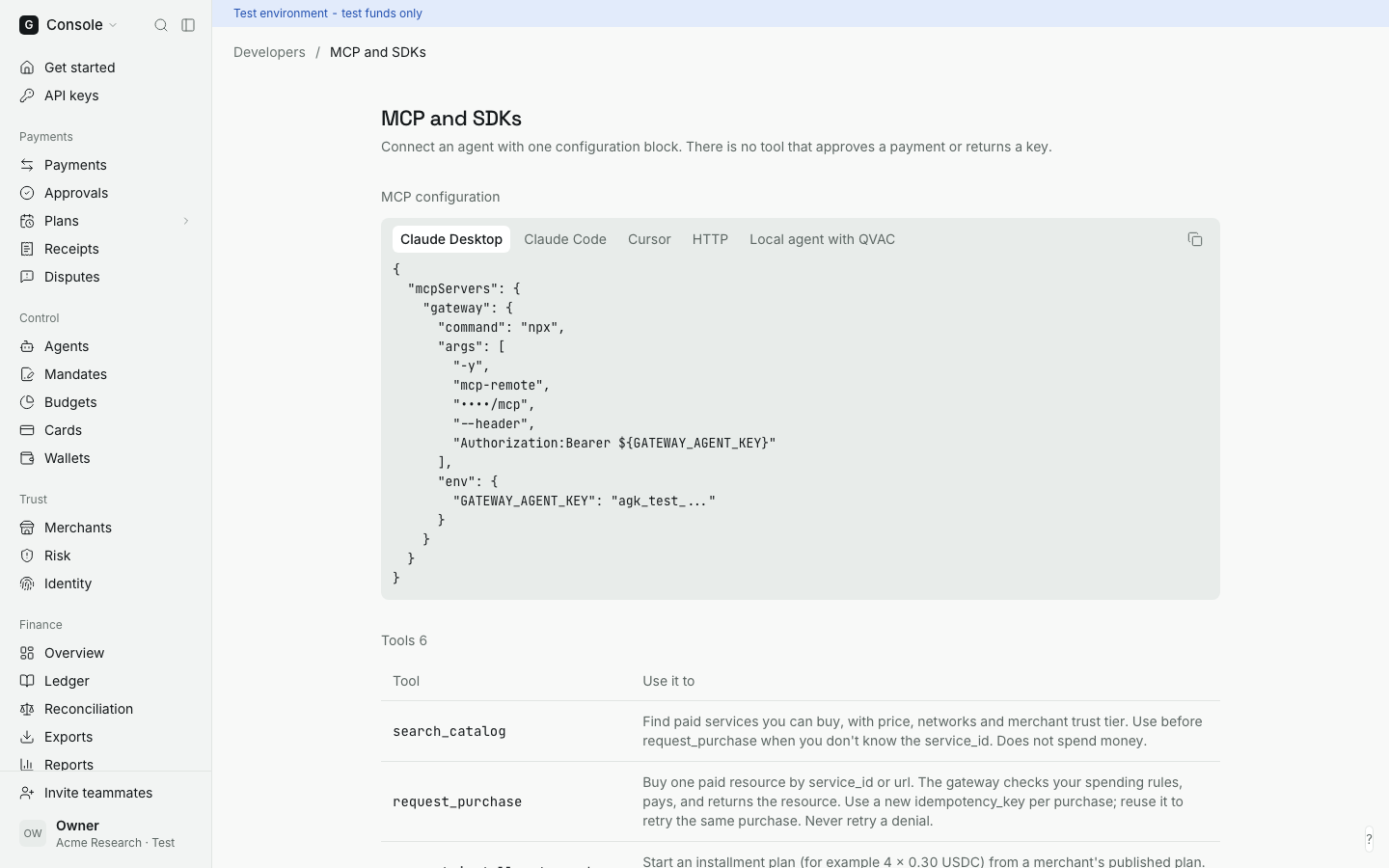
Abazi's MCP server speaks streamable HTTP at https://api.52-28-238-205.sslip.io/mcp. The agent sends its credential as a Bearer token on every request. Clients that only start local processes reach it over stdio through the mcp-remote bridge. In Claude Code it is one command:
claude mcp add --transport http abazi https://api.52-28-238-205.sslip.io/mcp --header "Authorization: Bearer $ABAZI_AGENT_KEY"Clients that take a JSON configuration, such as Cursor, use a URL and a header:
{
  "mcpServers": {
    "abazi": {
      "url": "https://api.52-28-238-205.sslip.io/mcp",
      "headers": { "Authorization": "Bearer YOUR_AGENT_KEY" }
    }
  }
}
Set ABAZI_AGENT_KEY to your agent credential, and replace YOUR_AGENT_KEY with it in JSON configurations: create one in the Console under Agents > New agent (shown once).
Exact setup for each client is in Agents and harnesses: Claude Code, Claude Desktop, Cursor and any MCP client.
The agent now sees six tools. None of them signs, moves funds outside a purchase or changes rules.
| Tool | What it does | Inputs (required in bold) |
|---|---|---|
| search_catalog | Find paid services you can buy, with price, networks and merchant trust tier. Use before request_purchase when you don't know the service_id. Does not spend money. | query, category, max_price_base_units, limit |
| request_purchase | Buy one paid resource by service_id or url. The gateway checks your spending rules, pays, and returns the resource. Use a new idempotency_key per purchase; reuse it to retry the same purchase. Never retry a denial. | service_id, url, task_id, idempotency_key, input, purpose, wait_seconds |
| request_installment_purchase | Start an installment plan (for example 4 x 0.30 USDC) from a merchant's published plan. Always needs owner approval of the total. Use only for plans, not single purchases. | plan_id, task_id, idempotency_key |
| get_purchase_status | Check a purchase you started: payment status and delivery status are separate. Use after awaiting_approval or submitted, waiting poll_after_ms between calls. | intent_id |
| get_spending_status | Your own budget: available, reserved and spent, plus your per-purchase limits and when your rules expire. Use when a purchase was denied for budget. | — |
| get_receipt | Get a signed receipt and its public verification link. Use to prove a purchase happened. | receipt_id |
Transports: stdio; streamable-http at https://api.52-28-238-205.sslip.io/mcp with Authorization: Bearer YOUR_AGENT_KEY (an agent credential).
Find a service
The agent calls search_catalog with a query. Each result carries a service id, the merchant and its trust tier, the price in base units, the asset and the networks. Searching spends nothing.
{
  "services": [
    {
      "service_id": "svc_...",
      "name": "Weather forecast",
      "merchant": "Forecast Co",
      "tier": "VERIFIED",
      "price_base_units": "50000",
      "asset": "USDC",
      "chains": ["solana:...", "eip155:..."]
    }
  ]
}
An agent can also buy from a URL that is not in the Catalog. If the URL answers with a valid x402 402 response, Abazi adds the merchant as UNKNOWN and the unknown-merchant limit applies.
Ask to buy
The agent calls request_purchase with the service id (or a URL), a task id and a fresh idempotency key. It does not send a price, an address or a network: Abazi takes those from the Catalog and the mandate.
{ "service_id": "svc_...", "task_id": "trip-plan-7", "idempotency_key": "trip-plan-7-forecast-1" }Reusing the same key with the same request returns the same purchase, so a retry after a dropped connection never pays twice. Reusing it with a different request is refused.
Read the result
The call waits up to 20 seconds by default for the payment to settle, then returns one of three shapes.
{
  "status": "paid",
  "intent_id": "pi_...",
  "decision": "ALLOW",
  "reason_code": "WITHIN_POLICY",
  "receipt_id": "rcpt_...",
  "amount_base_units": "50000",
  "asset": "USDC",
  "network": "solana:...",
  "rail": "x402",
  "merchant": { "name": "Forecast Co", "tier": "VERIFIED" },
  "resource": { "content_type": "application/json", "body": "{\"city\":\"Tbilisi\",\"high_c\":14}" }
}
If the payment has not settled within the wait, status is submitted with a hint to poll after two seconds.
Show the receipt
The agent calls get_receipt with the receipt id. It gets the signed receipt and a public verification link that anyone can open without an account. See Verify a receipt.
What the agent should do with each outcome
| Outcome | Agent action |
|---|---|
paid | Use the resource; keep the receipt id. |
submitted | Poll get_purchase_status after the suggested delay. |
awaiting_approval | Poll with the same intent; tell the user a person is deciding. |
Denied, retryable: true | Wait and try later, for example after KILL_SWITCH_ACTIVE is lifted. |
Denied, retryable: false | Stop and report the reason code and next action. |
Every code and its next action is in the reason code reference.
Failure cases
| Situation | Result |
|---|---|
| The credential is wrong, rotated or revoked | Denied with AGENT_CREDENTIAL_INVALID. |
| The budget left is too small | Denied with BUDGET_EXCEEDED; get_spending_status shows what is left. |
| No allowed network is funded | Denied with NO_FUNDED_CHAIN, with the candidate networks in the error. |
| The merchant's 402 asks for a different payout address | Denied with PAYTO_MISMATCH. |
Next steps
Console
The web apps where people set rules, approve purchases and see every payment, with Console, Merchant and Platform areas, public pages and a separate staff back-office.
Accept agent payments with a 402 response
Put a price on an HTTP endpoint with x402 middleware or a hosted endpoint, answer agents with a standard 402 response, and get paid in USDC.