How a payment works
Follow one agent purchase end to end, from the idempotent request through the policy decision, reservation, signing, settlement and reconciliation to the signed receipt.
The whole path
Payment lifecycle
What happens between a request and a receipt, including denials and approvals?
- Request
- Quote
- Decision
- Reservation
- Signing
- Submitted
- Settled
- Receipt
Request · step 1 of 8
The agent calls one tool with what it wants and an idempotency key. Abazi creates one payment intent.
Payment state
- current state: created
- awaiting_approval
- reserved
- signing
- submitted
- reconciling
- confirmed
- failed
- denied
- refunded
Path: created
Text description
A payment moves through eight stages: request, quote, decision, reservation, signing, submitted, settled and receipt. Its recorded state follows the payment state machine: created, then awaiting_approval or reserved or denied, then signing, submitted, and confirmed or failed; an unclear outcome goes to reconciling until the network answers.
Allowed
- Request (state created): The agent calls one tool with what it wants and an idempotency key. Abazi creates one payment intent.
- Quote: Abazi quotes the price and payout address from the Catalog, never from the agent, and Shield screens the purchase.
- Decision: The policy engine runs its fixed order. Nothing hits, so the decision is ALLOW. Reason code WITHIN_POLICY.
- Reservation (state reserved): The amount is reserved at organization, team and agent level in one transaction.
- Signing (state signing): The signer rechecks the pause switch, the mandate, the held reservation and the purchase fingerprint, then signs once.
- Submitted (state submitted): The rail adapter sends the payment. Abazi records the settlement reference and polls the network.
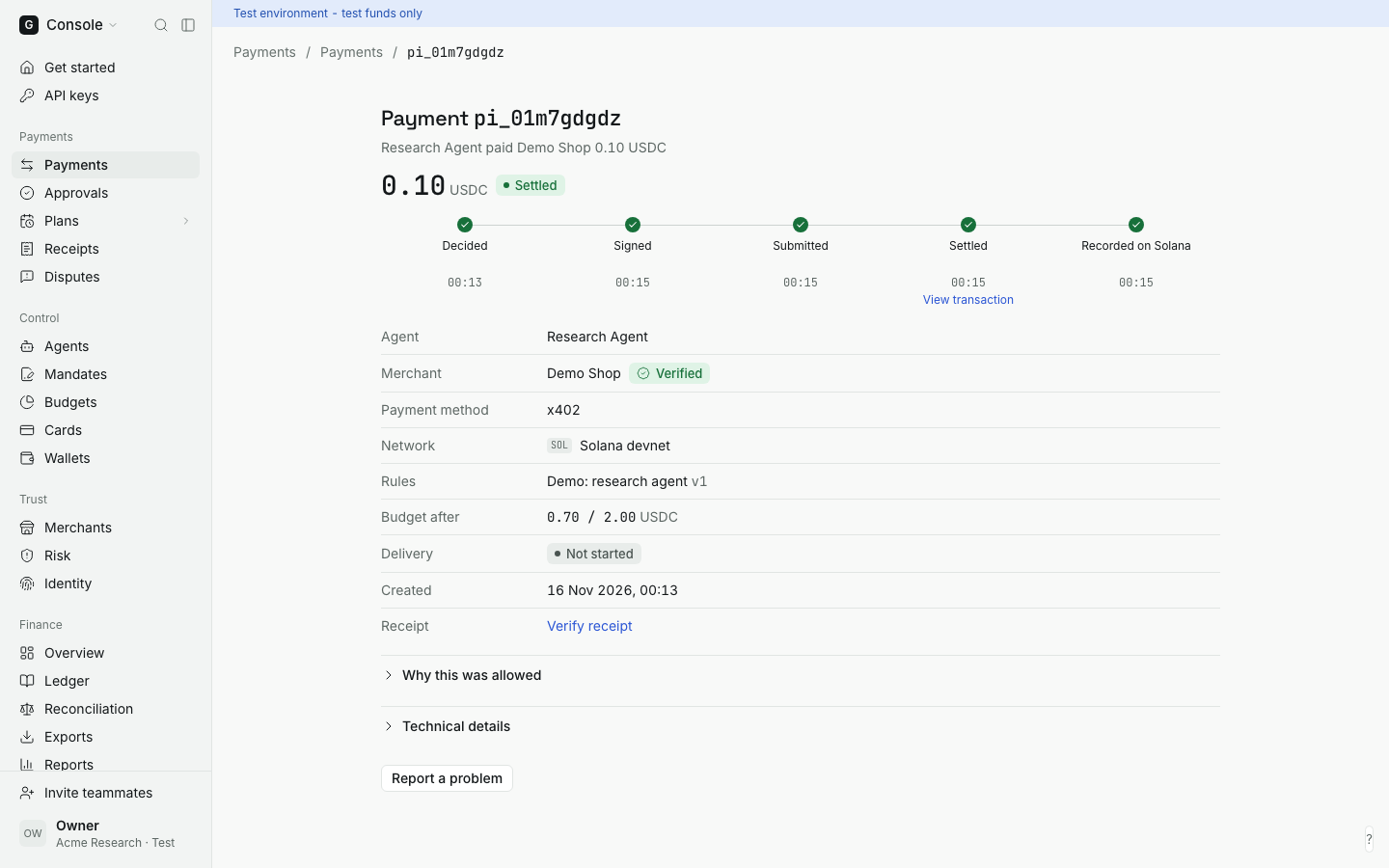
- Settled (state confirmed): The network confirms. The reservation is committed and the double-entry ledger posts.
- Receipt: A signed, hash-chained receipt is issued and its hash is anchored on Solana. Anyone with the link can verify it.
Needs approval
- Request (state created): The agent calls one tool with what it wants and an idempotency key. Abazi creates one payment intent.
- Quote: Abazi quotes the price and payout address from the Catalog, never from the agent, and Shield screens the purchase.
- Decision (state awaiting_approval): The amount is above the auto-approve limit, so the decision is REQUIRE APPROVAL. Approvers get a one-time link; nothing is reserved yet. Reason code ABOVE_AUTO_THRESHOLD.
- Decision: An approver approves with a passkey before the link expires (10 minutes). The policy runs again: the approval clears steps 5 to 7 only, every deny step still runs. Reason code WITHIN_POLICY.
- Reservation (state reserved): Only now is the amount reserved at organization, team and agent level.
- Signing (state signing): The signer rechecks the pause switch, the mandate, the held reservation and the purchase fingerprint, then signs once.
- Submitted (state submitted): The rail adapter sends the payment. Abazi records the settlement reference and polls the network.
- Settled (state confirmed): The network confirms. The reservation is committed and the double-entry ledger posts.
- Receipt: A signed, hash-chained receipt is issued and its hash is anchored on Solana. Anyone with the link can verify it.
Denied
- Request (state created): The agent calls one tool with what it wants and an idempotency key. Abazi creates one payment intent.
- Quote: Abazi quotes the price and payout address from the Catalog, never from the agent, and Shield screens the purchase.
- Decision (state denied): The amount is above the per-purchase hard cap. The decision is DENY with a reason code the agent can act on. Reason code HARD_CAP_EXCEEDED.
- Decision: Nothing is reserved and nothing is signed. The decision and its step-by-step trace are stored; the agent receives the code, the message and the next action.
Unknown outcome
- Request (state created): The agent calls one tool with what it wants and an idempotency key. Abazi creates one payment intent.
- Quote: Abazi quotes the price and payout address from the Catalog, never from the agent, and Shield screens the purchase.
- Decision: The policy engine allows the purchase. Reason code WITHIN_POLICY.
- Reservation (state reserved): The amount is reserved at all three levels.
- Signing (state signing): The signer rechecks the pause switch, the mandate, the held reservation and the purchase fingerprint, then signs once.
- Submitted (state reconciling): The send times out after the payment may have left. Abazi never signs twice: the intent moves to reconciling and the funds stay held.
- Settled (state confirmed): Reconciliation reads the network. Here the payment did land, so the intent is confirmed, the reservation committed and the ledger posted. Had it not landed, the intent would fail and the reservation would be released.
- Receipt: A signed, hash-chained receipt is issued and its hash is anchored on Solana. Anyone with the link can verify it.
Nothing is signed unless the policy says ALLOW, or a person approved and the policy then allows. Every step below writes a record you can read later in the Console: the intent, the decision with its trace, the reservation, the settlement, the ledger posting and the receipt.
1. Request, with an idempotency key
The agent calls request_purchase over MCP, or creates a payment intent over REST, with its Abazi agent credential. It names either a service from the Catalog or a URL that answers with a 402 response, and it sends an idempotency key. The key is required.
| The agent sends | Abazi answers |
|---|---|
| A new key | A new payment intent. |
| The same key with the same request | The same intent again. Nothing is bought twice. |
| The same key with a different request | An error: the key was used with a different request. |
When an intent waits for approval or for reconciliation, the agent is told to wait and check the status with get_purchase_status, not to retry with a new key.
2. Quote
Abazi works out what the purchase costs and whom to pay. The agent never supplies a price, an address, an asset or a network.
- For x402, Abazi calls the merchant's URL and reads its 402 payment requirements.
- For a Catalog service, it compares those requirements with the listing: payout address, asset, network, amount and service. Any difference is denied at policy step 2, for example PAYTO_MISMATCH.
- For direct USDT and for cards, the price and payout come from the Catalog.
Abazi then picks one network: the first in the mandate's order that is allowed and has funds (see How Abazi chooses a network). It also computes a fingerprint: a SHA-256 hash over the rail, merchant, payee, asset, network, amount, URL and request body. The fingerprint pins the exact purchase that later steps may sign.
3. Decision
Shield screens the merchant and the text of the purchase. Then the policy engine, a pure function with no model, no clock and no network call, runs its steps in a fixed order. The first step that hits decides.
| Decision | What happens next | Money |
|---|---|---|
| ALLOW | Go to the reservation. | Not yet held |
| REQUIRE APPROVAL | An approver is notified; the intent waits up to 10 minutes. See Approvals. | Nothing held while waiting |
| DENY | The agent receives the reason code and a next action. | Nothing held |
The order and every code are in Mandates and policy.
4. Reservation
On ALLOW, the amount is held at organization, team and agent level in one database transaction, locking the three budget rows in that order. If any level has too little left, the purchase is denied with BUDGET_EXCEEDED and the level that ran out, and nothing is held anywhere. See Budgets and reservations.
5. The signer checks again
A durable workflow hands the intent to the signer, the only part of Abazi that holds signing keys. Before it signs, the signer checks again:
- payments are not paused, for the organization or globally;
- the agent is active and its mandate is present, unexpired and not revoked;
- the reservation is still held;
- the fingerprint of the intent still matches the one that was decided or approved.
If any check fails, nothing is signed and the intent is denied. The reservation is released.
6. Settlement and confirmation
The rail sends the payment on its network: an x402 facilitator settles USDC, a direct transfer moves USDT, or the card issuer authorizes the card. Abazi then polls for confirmation, every 1.5 seconds for up to about a minute.
| Outcome | State | Money |
|---|---|---|
| Confirmed on the network | confirmed | The reservation commits. |
| Rejected before anything was broadcast | failed | The reservation is released. |
| Sent, but not confirmed or not readable in time | reconciling | The reservation stays held. |
7. Reconciliation of unknown outcomes
An unknown outcome is never retried by signing again. A payment that was signed is never signed a second time, also after a restart. Instead the intent goes to reconciling: a background task looks the transaction up on its network again, and finance can re-check it from the reconciliation view. When the network confirms it, the payment completes as usual. When it shows the payment failed, the reservation is released. Each settlement is also marked matched or unmatched, by comparing the amount and payee seen on the network with the intent.
8. Ledger and receipt
On confirmation, in one database transaction:
- the reservation commits at all three budget levels;
- the double-entry ledger posts balanced entries for the payment;
- a receipt is issued: canonical JSON, hashed with SHA-256, signed with Ed25519 and linked to the organization's previous receipt;
payment.confirmedis queued for webhooks.
Shortly after, a background task anchors the receipt hash on Solana in a memo transaction. Until that transaction is finalized, the receipt's anchor check reads PENDING; the payment itself is already complete.
Delivery is tracked apart from payment. A payment can be confirmed while the merchant's response failed; the owner can then open a dispute from the receipt.
The states of a payment
| From | Can move to |
|---|---|
| created | denied, awaiting_approval, reserved |
| awaiting_approval | reserved, denied |
| reserved | signing, denied |
| signing | submitted, failed, reconciling |
| submitted | confirmed, failed, reconciling |
| reconciling | confirmed, failed |
| confirmed | refunded |
created is the request; awaiting_approval waits for a person; reserved holds the money; signing and submitted are with the signer and the rail; reconciling is an unknown outcome being looked up; confirmed is final unless a refund follows.
Example
A walk-through with the limits of the example mandate.
| Purchase | Path |
|---|---|
| A verified merchant's service below the auto-approve limit of 0.10 USDC | created → reserved → signing → submitted → confirmed, receipt issued |
| The same service above it, below the hard cap of 0.50 USDC | created → awaiting_approval, then after a passkey approval the same path to confirmed |
| A purchase above the hard cap | created → denied with HARD_CAP_EXCEEDED, nothing held |
| The network does not confirm within the polling window | submitted → reconciling → confirmed once the lookup finds it |
Failure cases
| Where it stops | What the agent sees | Money |
|---|---|---|
| Policy denies | The reason code and a next action | Nothing held |
| The approver rejects, or nobody decides in time | APPROVAL_REJECTED or APPROVAL_EXPIRED | Nothing held |
| The price or payee changed after the approval | APPROVAL_INVALIDATED | Nothing signed |
| The rail rejects before broadcast | failed | Released |
| The outcome is unknown | A pending status that says the payment will not be sent twice | Held until resolved |
How to verify
Every receipt can be checked by anyone with its link: the public page runs four checks (hash, signature, chain link, on-chain anchor) without an account. See Verify a receipt.
Next steps
Choose your path
A reading order for each role (agent developer, owner, finance, merchant, platform), with what each one does with Abazi.
Supported rails, networks and assets
Every rail Abazi pays on, every network and asset behind it, the protocols it speaks, how one network is chosen for each payment, and the one receipt every rail produces.