Budgets and reservations
How organization, team and agent budgets stay correct when many agents pay at once, and how held money becomes committed or is released.
Who needs it
Owners and finance, who set one limit for many agents and need it to hold. Agent developers, whose agents can read their own budget left before they buy.
Three levels, three numbers
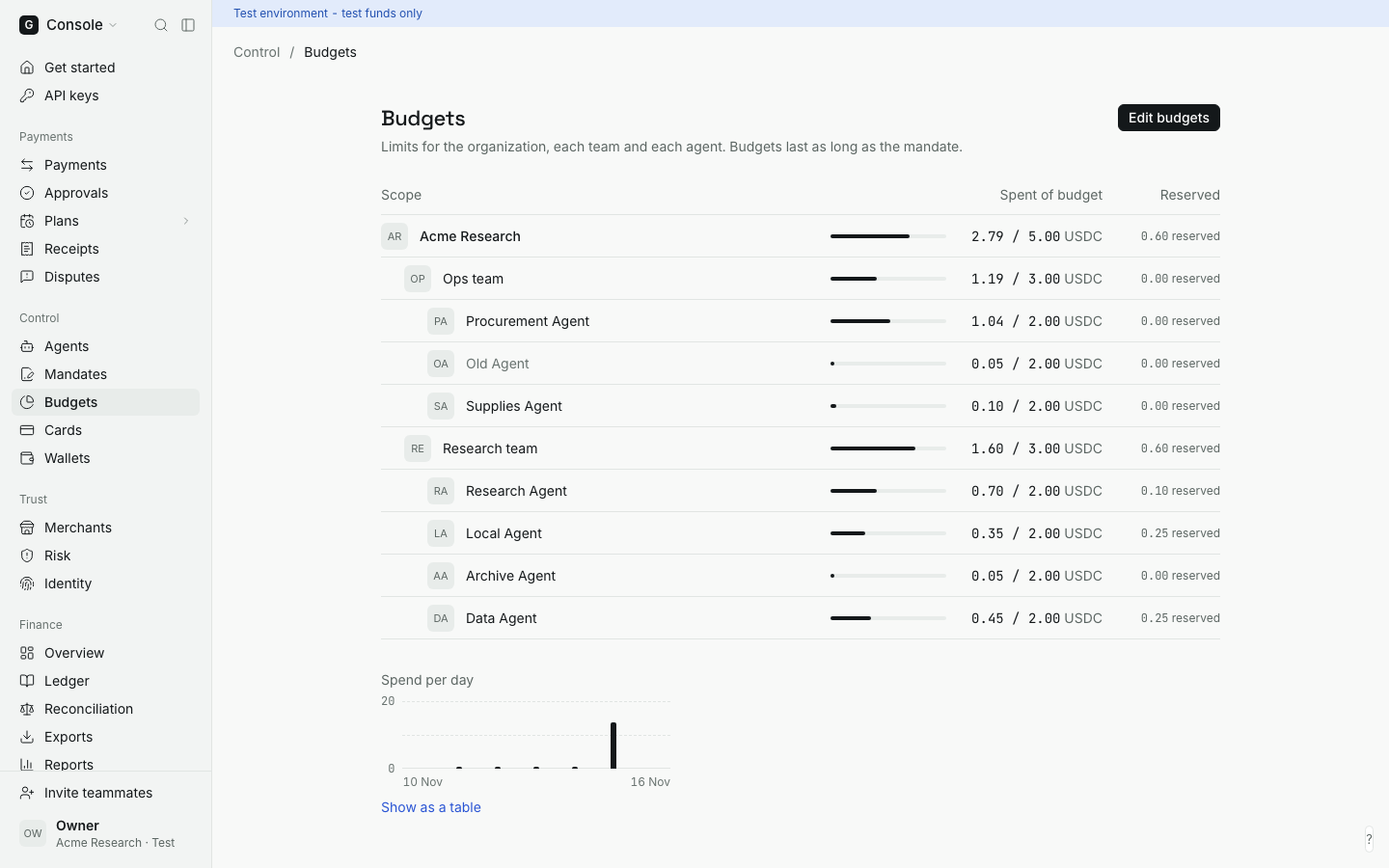
A budget exists for the organization, for each team and for each agent. Each one has a limit and two running amounts:
| Amount | Means |
|---|---|
| Reserved | Held for payments that are decided but not yet confirmed. |
| Committed | Spent: payments the rail confirmed. |
| Left | The limit minus committed minus reserved. |
The tree is consistent: a team's limit cannot exceed its organization's, and an agent's cannot exceed its team's (or the organization's when the agent has no team). An edit that breaks this is refused.
How a reservation works
When the policy says ALLOW (or a person approved and the policy then allows), Abazi reserves the amount in one database transaction:
A reservation then moves through three states:
| State | When | Effect on all three budgets |
|---|---|---|
| Held | The reservation succeeded | Reserved goes up |
| Committed | The rail confirmed the payment | Reserved goes down, committed goes up |
| Released | Denied after reserving, rail failure, cancellation | Reserved goes down |
The policy engine also reads the budgets, without locks, at step 4, so it can explain a denial early. The reservation is the real check.
Boundary
- Budgets are limits, not thresholds. An approval clears only the "ask a person" steps of the policy. It never lifts a budget or the hard cap. See Approvals.
- Unknown outcome keeps the money held. If the rail sent the payment but Abazi cannot confirm it yet, the reservation stays held until reconciliation settles it. The payment is never signed twice.
- Plans reserve once. An installment plan reserves its total when it is approved and commits one share per pull. Cancelling releases the rest.
- Refunds give the budget back. A settled refund lowers committed at all three levels.
- An agent sees only its own budget. Through
get_spending_status, an agent reads how much of its own budget is left, never another agent's. - Early warning. When committed plus reserved reaches 80% of a limit, an alert is sent once for that budget. It can be switched off per budget.
Example
A typical mandate uses these budgets: organization 5.00 USDC, each team 3.00 USDC, each agent 2.00 USDC.
Two agents of the same team request a purchase at the same moment, and the team has room for only one.
| Moment | First agent | Second agent |
|---|---|---|
| Both pass policy | Locks organization, team, agent | Waits on the organization lock |
| First transaction ends | Reserved | Gets the lock, reads the reduced amount left |
| Check | Team level too low: DENY BUDGET_EXCEEDED, scope team, nothing reserved |
Failure cases
| Case | What happens |
|---|---|
| One level has too little left | DENY BUDGET_EXCEEDED with that level. Nothing is reserved anywhere. |
| An approval comes back after the budget was used meanwhile | The policy runs again with the approval and denies. Nothing is reserved. |
| The rail rejects the payment before broadcast | The intent fails and the reservation is released. |
| The outcome is unknown after signing | The reservation stays held while the payment is reconciled. |
| A plan is cancelled after two of four pulls | Two shares stay committed; the rest is released. |
How to verify
- The Console's budget page shows the limit, committed, reserved and what is left for every level.
- Each payment's detail page shows its reservation and when it was held and committed.
Next steps
Mandates and policy
How an owner's signed spending rules become one deterministic decision per purchase, in a fixed order, with a reason code an agent can act on.
Approvals
What happens between REQUIRE APPROVAL and payment, what an approver signs with a passkey, who may approve, and why an approval can never lift a limit.